So for whatever reason you can’t get to your blog (or Twitter or Facebook). Yourworkhasprobablyblockedit#ahem. But don’t worry! You CAN still post to it…even on your cell phone!
Posterous.com to the rescue! My posterous.com site is pictured below. As you can see, it looks like a very simple blog. And if you’re really paying attention, you’ve seen that post on here already. So why do you need another blog to post to your real blog? Well, Posterous.com is an online blog BUT with a lot of bells and whistles so yes, your content may be duplicated in some cases, but that’s ok! No one even needs to know you’re posting from posterous! Let’s see how this works!
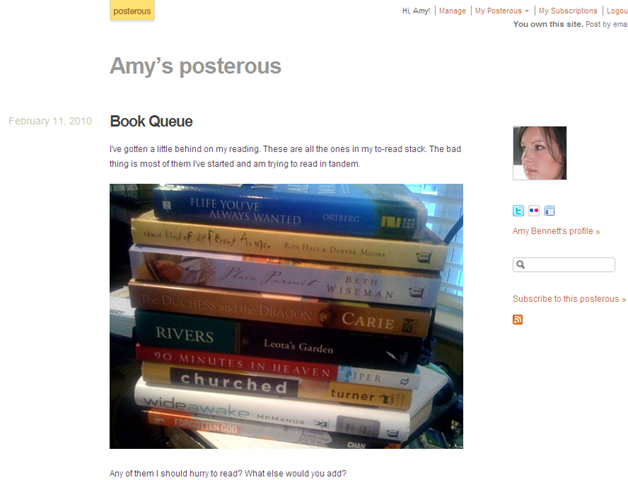
Click in to see!
For you techy people the short-hand of all this is create a posterous.com account, add your blog as a service and then email your post to blog@posterous.com and it will post on posterous AND your blog.
For those of you that need a visual (or those of you techy people like me that likes visuals), here are some detailed steps:
First you want to sign up for an account. All posterous sites have the format yoursitename.posterous.com. You won’t really see this anywhere if you’re using this just to post to your blog so don’t sweat it if your preferred name is taken.
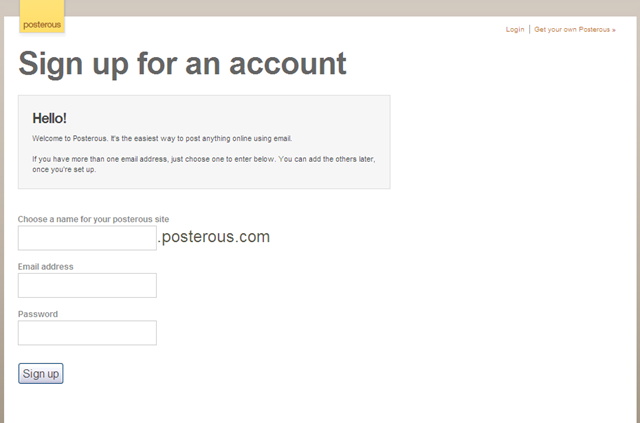
Once you’re in there click on Autopost. What this page is setting up is all the places you could possibly want your post to go after it’s posted on Posterous. Posterous calls these Services. The main service you probably want is your blog.

Click on Add a Service and you can see your options

The two most popular on probably going to be Blogger and Other Blog. You might have Typepad or WordPress but I’ll be surprised. When you click on Other Blog this is what you see:

For you Blogger/Blogspot folks, this is what you’ll see:

You’ll need to enter your account information. Once that is done, you are set to post to your blog from email! All you do is email from the account you signed up with to “blog@posterous.com”. It will post the entry to your posterous.com blog and to your blog you just added and then email you back a link to both.
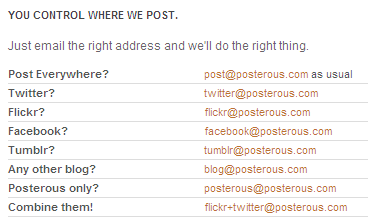
Now. Once you’ve gotten this far, you can add more services. You may have noticed on mine that I had Twitter. You can also add Flickr or Facebook or many more! Now you have to tell it to post to them as well so if you want it to go to your blog AND Facebook you need to email “blog+facebook@posterous.com”. This chart helps explain it:
So that’s it! Email away your posts!
One more thing I want to mention is you can add more than one email account so that if you have a work email and home email you might be emailing the post from you can do that! Just go to your account and edit your contact info.

OK, one more thing. These posts include pictures! So when you attach a picture to your email, it automatically resizes it and if you attach more than one, it creates a pretty gallery for you!

Cool, huh?
Check out that Book Queue post on my blog to see how it turns out!
Now post email away!